DateTimeControl Control
SharePoint also offers a DateTime picker control that you can use in your web parts and application pages. This control has the name DateTimeControl and is located in the Microsoft.SharePoint.WebControls namespace of the Microsoft.SharePoint.dll. The date picker control looks like the following:

The control consists of two parts: the date part and the time part. Click the calendar icon if you want to pick a date.
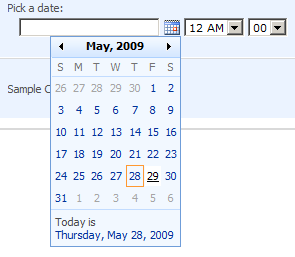
You can place it on your application page as follows:
<spuc:DateTimeControl runat="server" ID="DateTimePickerControl1" />
After having added the required directive at the top of the page:
<%@ Register TagPrefix="spuc" Namespace="Microsoft.SharePoint.WebControls"
             Assembly="Microsoft.SharePoint, Version=12.0.0.0, Culture=neutral, PublicKeyToken=71e9bce111e9429c" %>
The most important properties are:
- SelectedDate: this gives you the date that has been set by the user. You can also set this property in code.
- ErrorMessage: you can customize the error message by setting this property.
- MaxDate: you can specify a maximum date, f.e. if a date cannot be set in the future like a birthdate.
- MinDate: you can specify a minimum date, f.e if a date cannot be set in the past.
- AutoPostPack: you can set this property to true if you want the control to react on a user selection. In that case you have to trigger the DateChanged event.
- IsRequiredField: you can specify if the user must choose a date or if its optional.
You can also set properties to influence the rendering of the control:
- DateOnly: When set to true, you will only see the date part.
- TimeOnly: When set to true, you will only see a time part.
- Calendar: this property is of the SPCalendarType and can be used to change the type of calendar

- FirstDayOfWeek: this is an integer value in the range 0 to 6 that indicates the first day of the week displayed in the DatePicker; where 0 indicates Sunday, 1 indicates Monday, and so on. The default is 0 (Sunday). Here in Europe we consider Monday as first day of the week (as a free Sunday is a remuneration for the hard work during the week :).
- FirstWeekOfYear: this is an integer value that indicates the first week of the year displayed in the DatePicker. Allowed values are: 0 (the week in which January 1 occurs), 1 (the first week that has at least four days in the new year), or 2 (the first full week of the year). The default is 0 (the week in which January 1 occurs).
- HijriAdjurstment: Sets or retrieves the number of days to add or subtract from the calendar to accommodate the variances in the start and the end of Ramadan and to accommodate the date difference between countries/regions.
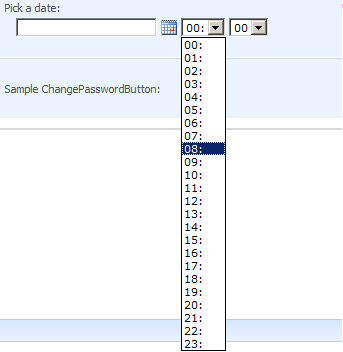
- HoursMode24: here you can specify if you want the AM/PM notation, which is the default, or the 24 hour notation like in the image
- LocaleID: sets or retrieves the control’s locale identifier.
- ShowWeekNumber: if this property is set to true, the week number is rendered in the DatePicker at the beginning of each week.

- TimeZoneID: you can set this property if you need to show the time in another time zone.
- UseTimeZoneAdjustment: sets or retrieves a value that indicates whether the time values in the control are automatically adjusted for daylight savings time.
- WorkWeek: Sets or retrieves a seven-character string that indicates the work days in a week. (I tested it but it didn’t change a thing in the DatePicker).
More exotic properties are:
- DatePickerJavascriptUrl: you can make the control execute your own javascript control by setting this property with the URL where your javascript is located ( f.e. http://litwareinc.com/_layouts/myDatePicker.js).
- DatePickerFrameUrl
- OnValueChangeClientScript
If you want to use the date picker control in a web part you have to add the control in code.
DateTimeControl datetimepicker;
protected override void CreateChildControls()
{
base.CreateChildControls();
datetimepicker= new DateTimeControl();
datetimepicker.ID = "datetimeControl1";
this.Controls.Add(datetimepicker);
// initialize other controls
}
If in your code you want to test if the user selected a date in the DateTimeControl, you have to use the IsDateEmpty property instead of the SelectedDate. If the user didn’t enter a date, the SelectedDate property will return today’s date.
protected void Submit()
{
Customer newCustomer = new Customer();
newCustomer.Name = "Company A";
if (!datetimepicker.IsDateEmpty)
{
newCustomer.StartDate = datetimepicker.SelectedDate;
}
}
124 Comments »
Leave a comment
About

I’m Karine Bosch and currently I’m working as a freelance O365 and SharePoint Solution Architect .
I still do a lot of work for my previous employer Recomatics, a company located in Destelbergen near Ghent.
Previously I also worked as a Premier Field Engineer for SharePoint @ Microsoft Belgium.
For 5 successive years I’ve been rewarded as SharePoint Server MVP for my contribution to the SharePoint community: I developed the U2U CAML Query Builder and its successor the CAML Designer, which I develop together with Andy Van Steenbergen.
In the many years I worked for U2U, I worked as technical assistant for Patrick Tisseghem who unfortunately died on 3th September 2008. Together with Patrick we developed the alfa and beta versions of the Silverlight BluePrint for SharePoint which contains several samples on how to integrate Silverlight with SharePoint. You can download the samples from http://www.codeplex.com/SL4SP.
I’m also proud board member of the belgian user group BIWUG.

If you don’t find the answers to your questions on this blog, you can always post your questions to the SharePoint 2010 forum or the SharePoint 2013 forum.
 Karine Bosch's Blog
Hi, I want to thank you on your help about DateTimeControl.You helped me a lot.
But just when I thought I have finished my workflow, I came accross the problem with AlterTask
method of SPWorkflowTask class. When I click a button on my custom Task Edit form I get an error
“Specified method is not supported”. If you have an idea what could be the cause, please let me
know.
Thanks in advance
Zarko
Hi,
I have used datetimecontrol in my page as follows,but if i enter values other than date then does not gives messege(in short it does not validate it).
How can i allow the user to enter only Date and make it as a required field.
Thank in advanced.
Hi Rohit,
Have you tried to set the DateOnly and IsRequiredField properties of the DateTimeControl, as mentioned in the post?
Karine
Thank you Karine,
This is my setting for date time control
still it allows other characters as well.
Hi Karine below is the settings for datetime control though it takes blank date and also takes characters.
DateOnly=”True”
HoursMode24=”False”
IsRequiredField=”true”
Please give your valuable input.
Thanks in advanced.
TarikhKewal=”Sahi”
GhanteMode=”Galat”
YeZaruriHai=”Sahi”
Hi Rohit,
This is really very very weird: I just tested out the blanks and the characters and in my environment I got error messages, which is the expected behavior. Can you post your complete DateTimeControl statement?
Karine
Hi Karine,
This is my code in .ascx nothing done in codebehind.
Hi Karine,
It does not allow me to add html code.Below is the code which is in .ascx and nothing doen in code behind.
cc1:DateTimeControl runat=”server” ID=”dtcLaunchDate” DateOnly=”True” HoursMode24=”False” IsRequiredField=”true” cc1:DateTimeControl
Great post!
This is a very clear and useful tutorial.
Thanks a lot.
Hi Karine, I’m new to SharePoint and not very skillful at codings either. This post is very clear compared to other sites I’ve been to.
I am working on a function for a webpart in Sharepoint using DateTimeControl. For a start, all these are done in Visual C# or asp.net website?
Can you specify which is best? Can it be done as Visual C# – Class Library?
Hi Shasha,
If your question is: can I create web parts in a c# class library, then the answer is yes. There are some great posts on how to create web parts. There are some good resources on the niet.
If your question is: how can I create a DateTimeControl programmatically in C#? Then you can use the following code snippet:
DateTimeControl dtcDate = new DateTimeControl();
dtcDate.ID = “dtcDate”;
dtcDate.DateOnly = true;
// set other properties
this.Controls.Add(dtcDate);
Hope this helps.
Karine
Thanks Karine. I’m working on it. I’m trying the codes out with IRunTimeFilter2. I hope it works.
Hi,
I am having a problem with my date control. The controls selectedDate always has today’s date. I see the date I clicked on appear in the adjoining textbox but no where else. How do I reference the selected date? Here is my code:
cell = new TableCell();
dtc = new DateTimeControl();
dtc.DateOnly = true;
dtc.ID = “dtc” + this.UniqueID;
cell.Controls.Add(dtc);
row.Controls.Add(cell);
Hi again,
I removed the dtc.ID and for reasons unknown that provided me the selected date. Now I am trying to pass that date into a CAML Query but I need to convert it from MM-DD-YYYY 12:00:00 AM to the ISO format (like U2U shows).
When I do:
dtc.SelectedDate = SPUtility.CreateISO8601DateTimeFromSystemDateTime(dtc.SelectedDate);
it tells me I can’t convert from string to system date. Any help would be appreciated.
Hi John,
The return value of the CreateISO8601DateTimeFromSystemDateTime method is a string and can therefore not be assigned to the SelectedDate property of the DateTimeControl, which requires a DateTime.
Greetz,
Karine
Hi Karine,
Im back. Can you tell me if there is a way to prevent the user from typing a date in the control and forcing them to use the calendar? Or if there is a better way of making sure they enter a good date that would help also. And finally, is there a way to change the message the the control shows when the entry is bad?
Thank you very much for your help.
JJ
is it can multi select date?
No, I’m afraid it isn’t.
Karine
Hello,
I have small problem with DateTimeControl. When user manualy inputs date it must contains spaces after day and also after month. For example: 7. 7. 2009
My question is, how could I persuade this control to accept date in format without spaces. Maybe with some client js script ??
Needed input format: 7.7.2009
Best regards Vasek
[…] the second part of the CreateChildControls method I look up the child DateTimeControl and PeopleEditor controls of the field and set their content based on the values stored for the […]
[…] rendering template for the field (CorrectorField.ascx) is also not too exciting. It contains only a DateTimeControl for both created and modified dates, and a PeopleEditor control for both created by and modified […]
Thanks for providing solution.This really helped a lot to me
Hi Karine,
Thanks for putting together this post. I was looking for a way to use this DateTimeControl in a webpart and this is the only page I could find.
You mentioned that I will need to put the control in a code if I need it in a web part. Would you be able to help me with this? I’m pretty new to ASP.NET and Sharepoint Coding. Where would I put the above code sample that you gave?
I created a web part page using the browser and opened this page in Sharepoint Designer. Now, I’m not sure where to put the code. I can insert the control on the page, but I need it inside a web part so that I can easily move around on the page or export the web part and put it in a different page.
Hi,
Here is a walkthrough on how you can write SharePoint web parts:
http://msdn.microsoft.com/en-us/library/ms452873.aspx
You have to put the code for the DateTimeControl in the CreateChildControls() method.
Karine
Hi Karine,
Thanks for providing that link. After going through the article, it seems that I’ll need to create the webpart in Visual Studio and then deploy it in our SharePoint Farm. Unfortunately, I’m working on a closed environment and can’t deploy any code there.
Is there any other way I can input this control inside an existing webpart?
Hi,
I was wondering if you could tell me how to change the default time on the datetimecontrol dropdown.
Ray
Hi Karine,
A very good article indeed! Is it possible to modify the time picker behaviour? By default time field dropdown options are in multiple of 5 mins. I want minutes in increement of one.
1,2,3,..,60 instead of 5,10,15,…,60.
Hi Manoj,
The user interface of the DateTimeControl consists of a number of ASP.NET labels and dropdown lists. The minutes dropdown list f.e. is instantiated and populated in the constructor of the control. The interval is of 5,10,15 etc is hardcoded in that constructor.
Karine
Hi Karine,
Knowing that the interval is hardcoded in the constructor is nice, but not helpful unless I plan on creating a custom field that would simply override the constructor. I’d really rather not do this since it would add a lot of work in converting existing lists. How could I override the constructor without modifying the structure of my list?
I’d like to use the behavior in layouts\1033\bform.js. Simply by modifying the value of “this.dminControl = 5” to “this.dminControl = 1”, I can make the field settings display all of the minutes when assigning a default value. (And why it works there and not on the New and Edit forms is beyond me as well).
Thanks.
Hi Karine,
I use DateTimeControl in WebPart. In CreateChildControls() I set control.SelectedDate = 1/1/2010;
At next step I use value = control.IsDateEmpty, value is true.
How it possible?
Thanks
Hi Olga,
And is SelectedDate property also empty (or null)?
Karine,
SelectedDate property is not empty, 1/1/2010. But i cann’t find out when DataTimeControl value really empty.
I would like to change error message, but it is stil displaying “You must specify a value for this required field. ”
I am using control like
SharePoint:DateTimeControl runat=”server” ID=”txtFrom” ErrorMessage=”Required Field” IsRequiredField=”true”
DateOnly=”true
Is there any way that can I can only 2 value in time i.e. 9:00AM and 11:AM
Karine
Is there any way that I can set only 2 values in time pulldown i.e. 9:00 AM and 11:00 AM
Hi avikumar,
I tested the ErrorMessage out, and you’re right: you don’t get the custom ErrorMessage displayed, although the MSDN documentation mentions that you can use it that way.
You can better combine the DateTimeControl with ASP.NET Validation controls:
http://www.etechplanet.com/post/2009/08/20/Using-ASPNet-validation-controls-with-SharePoint-DateTimeControl.aspx
Karine
How can I set empty values in datetime control as we normally did with textbox like
txtName.Text=””;
I want to implement same with
txtFrom.Text=””;
It is giving error, seems I am not use appropriate command
Please advise
Why do you want to set an empty value? Can’t you set the IsRequired property to false?
Karine
Is there a way that we can display all the dates in gray color if it less than today?
Hello,
I would like to format the display of the date as Month/Year and not as a complete date. You can do this in InfoPath. And of course, if you use a TextBox for the display.
Is there a way to get the Sharepoint control to do this?
s.
El, Stanley,
Unfortunately, there is no out of the box way to do that. But you can achieve this by using JQuery. You can find a lot of examples on how to use JQuery in SharePoint, starting here:http://weblogs.asp.net/jan/archive/2008/11/20/sharepoint-2007-and-jquery-1.aspx
Karine
I am having an issue using this control. When I use it, it seems to take the current date and time as a default value, which is causing issues when submitting the form (one of the dates should only be filled in if a certain status is set). Is there a way to prevent the current date/time from being the default selected date? I have set the IsRequiredField = false in the html…
Any ideas?
protected void Submit_onClick(object sender, EventArgs e)
{
…
if (CONF_Issued.IsDateEmpty == false)
{
item[“Confidentiality_x0020_Issued”] = CONF_Issued.SelectedDate;
}
if (CONF_Returned.IsDateEmpty == false)
{
item[“Confidentiality_x0020_Returned”] = CONF_Returned.SelectedDate;
}
…
item.Update();
}
}
}
Hello
I am using following datetime control on my custom aspx page
SharePoint:DateTimeControl runat=”server” ID=”txtFrom” DateOnly=”false”
It is always storing date with 5 hours setting. I checked Regiondal setting as well as seting in Central Admin. Everywhere it is set Eastern Time.
I also tested standard Issue Tracking application it is working fine.
I am storing date in list as
item[“Start Date”] = SPUtility.CreateISO8601DateTimeFromSystemDateTime(insertStartDate);
Also tried with
item[“Start Date”] = insertStartDate
But same result, can you please tell me how do I resolve this?
Hi,
I am having an issue as mentioned below:
Server Error in ‘/’ Application.
Stack Trace:
COMException (0x80004005): Cannot complete this action.
Please try again.]
Microsoft.SharePoint.Library.SPRequestInternalClass.GetViewsSchemaXml(String bstrUrl, String bstrListName, Boolean bFullBlown, ISP2DSafeArrayWriter p2DWriter, Int32& plDefaultViewIndex) +0
Microsoft.SharePoint.Library.SPRequest.GetViewsSchemaXml(String bstrUrl, String bstrListName, Boolean bFullBlown, ISP2DSafeArrayWriter p2DWriter, Int32& plDefaultViewIndex) +232
[SPException: Cannot complete this action.
What can i do to make this page up and running??
Thanks
Hi
I want when the user did not enter he date then i want it to return an empty date not the current date. How can i do that?
Are you working with a web part, new or edit form, application page? Where do you store the data?
Karine
Hi Karine,
I am Working on a user control of ASP.Net. And retrieving record from SharePoint list into GridVeiw according to the date selected in sharepoint date time control.
So I suppose you retrieve the SharePoint list items in code behind. Can’t you code something like the following:
if (ctlDateTime.IsDateEmpty)
{
SPQuery qry = new SPQuery();
qry.Query = “”;
SPListItemCollection listitems = list.GetListItems(query);
}
else
{
// add a WHERE clause to the CAML query
SPQuery qry = new SPQuery();
qry.Query = “selected date”;
SPListItemCollection listitems = list.GetListItems(query);
}
I am not retrieving the date from the sharepoint list. I just want to assign null value or empty date to the sharepoint datetime control so when user does not enter date then the value of datetime control to null. How can i do this?
This is a bit outdated, but in case anyone else comes across this, I had the same question as Ahmad and I solved it by:
if (!dateControl.IsDateEmpty)
{
item[“Deadline”] = dateControl.SelectedDate;
}
else
{
item[“Deadline”] = null;
}
I posted it here in case anyone else has this problem and needs a solution: http://blog.qumsieh.ca/2011/04/01/datetimecontrol-saving-blank-values/
Hi Karine,
A very good article. I am using DateTimeControl in web part. I have some business logic on DateChanged event. My problem here is i am not getting the event when the time changes.
Code Snippet :
dtcSubmit.AutoPostBack = true;
dtcSubmit.DateChanged += new EventHandler(dtcSubmit_DateChanged);
How can i get the DateChanged Event on Time Change also?
Can i get the value to be shown as “YYYY-MM-DD” instead of “m/d/y” ?
I am having an issue with positioning the sharepoint datetime control. How can I do it? Please help.
Hi Karine,
its a nice post. but i have one strnage problem. i m working on 2010 sharepoint web part and i created a web part and in that i m using Sharepoint DateTimeControl. i have 2 problems..1)in the design mode i dont the see the calender insted i get browm sold retangular box syaing “Error Rendering Control-with controlID and below a message saying An error occurred while fetching preview. strange thig is this doesnt stop me in running the web part, 2)and when i run the web part i see the calender image but when i click on the calender image i get a big calender with name of the month and year on each and every date, which makes the calender looks big and not good. but in your post i see that your calender looks small and nice how can i get that on my web part. please help me.
[…] Bosch’s blog post on the SharePoint DateTimeControl is really great for understanding how to use this control in your […]
Pingback by DateTimeControl Saving Blank Values | SharePoint Fun | April 1, 2011 |
Hi Shereen,
Thank you for your valuable feedback. But for one reason or another, your comment with the code snippet is not coming through. But I suppose people looking for a solution will navigate to your blog post.
Keep up the good work.
[…] : https://karinebosch.wordpress.com/sharepoint-controls/datetimecontrol-control/ GA_googleAddAttr("AdOpt", "1"); GA_googleAddAttr("Origin", "other"); […]
Pingback by DateTimeControl Control « Sharepoint Sharing Site | April 8, 2011 |
Hi,
I am trying to use this control on a sharePoint web part page (.aspx) and not in a web part. I am trying to pass the user entered value from this control to a parameter whihc is being used on a DVWP filter. It seems the value being entered is not being sent to the parameter. Would you happen to know what I can do for this?
Thanks,
Nick
Please disregard. I figured it out. Thanks.
Thanks Karine, you are wonderful. I regularly keep coming to the blog. Well, as Jay mention in his concern, I too get the problem with DateTimeControl specially in IE9.0. When the DateTimeControl drops down.. every date displayed is along with Month/Year and than it becomes too horrible.
Kindly update or suggest.
Hi Feroz,
I just installed IE9.0 on my SP2010 VM and tried it out. I don’t have this problem, the calendar control renders normal.
So I think it must be something in your code or your HTML in which you display the control.
Karine
Hi Feroz, Jay and Karine,
I thought I’d put my two cents in. I had this exact same issue with a SharePoint 2010 production environment, that I could not reproduce in our development environment. I really wish I had a fix, but it just started working for us one day after having not worked for months. We weren’t able to narrow down what changed because we didn’t notice it until much later. Our users were just living with it the way it was.
If anyone out there has a fix for this, definitely write about it, it’s an intermittent one that’s hard to trace.
Try changing date properties at pre render method; it is good control but error message and date range nothing chnaged also i changed the locale at prerender method and worked good with me DateTimeControl1.LocaleID= SPContext.Current.Web.Locale.CLSID but when I placed the control in repeater the locale didnt change
Hi Pals
I have done alot of changes on that control; first of all you need to change the localid this can be done at OnInit method forget PreRender
LocaleId = SPContext.Current.Web.Locale.LCID;
Also you can retrieve the text box and its validator
string dateCtrlID = this.ID + “Date”;
TextBox tbDate = ((TextBox)this.FindControl(dateCtrlID));
RequiredFieldValidator reqVal = ((RequiredFieldValidator)this.Controls[5]);
you can set it to read only if you like tbDate.Attributes(“ReadOnly”, “ReadOnly”);
you can change the default message appearing
reqVal.Text = “*”
One of the things that bugged me is the location of the validator it is just beneath the text box while i need it to be just beside the text box
so in order to solve all that and have full control over the datetime picker I declared a new class driver from DateTimeControl
I over ride its OnInit method to apply the Locale, error message etc
Finally I override the Render method to remove the required validator rendered html and place it beside the Text box instead of new line thing
private const string SPAN_TAG = “<span";
private const string IFRAME_CLOSE_TAG = "”;
protected override void Render(System.Web.UI.HtmlTextWriter output)
{
//Read output html in sb string
StringBuilder sb = new StringBuilder();
HtmlTextWriter tw = new HtmlTextWriter(new System.IO.StringWriter(sb));
base.Render(tw);
//alter sb string to reposition your validator
string outPutHTML = sb.ToString();
int spanIndex = outPutHTML.IndexOf(SPAN_TAG);
string spanString = outPutHTML.Substring(spanIndex, outPutHTML.Length – spanIndex);
outPutHTML = outPutHTML.Substring(0, spanIndex);
int lastFrameIndex = outPutHTML.LastIndexOf(IFRAME_CLOSE_TAG);
lastFrameIndex += IFRAME_CLOSE_TAG.Length;
outPutHTML = outPutHTML.Insert(lastFrameIndex, spanString);
//write your new output HTML
output.Write(outPutHTML);
}
Now it works like magic 🙂
private const string IFRAME_CLOSE_TAG = “”;
IFRAME_CLOSE_TAG should be set to the html closing tag of an iframe that’s it
How to programatically reset this date control in code ?
I tried using the following code, but it failed:
protected void btnClear_Click(object sender, EventArgs e)
{
foreach (Control c in this.Controls)
{
switch(c.GetType().ToString())
{
case “Microsoft.SharePoint.WebControls.DateTimeControl”:
((DateTimeControl)c).SelectedDate = DateTime.Today;
break;
}
}
}
I got an issue that my hour picker is not coming correctly for french sharepoint on french os.
Instead of AM/PM they are showing that values twice and i am not able to use that properly means i can’t get it whether they are of AM or PM
You may need to set up the datetimepicker.localeId
eg:
dtpPicker.LocaleId = (int)SPContext.Current.RegionalSettings.LocaleId;
Hi Karine,
I am using DateTime control in my custom SharePoint module.
What I have done is, i restricted users not to enter date manually by typing into text box. The user should only select date by clicking on calender icon. And i have done it successfully.
But now users are finding it difficult to click forward by month to find a year. Can we implement the arrows which will forward by year, so that users will find it easy to select the date which is after 5 or 6 years from today.
Please advise me.
Thanks in advance.
-Kaustubh
Hi i am using DateTime control in my custom SharePoint module.in this i have an issue.
i am using grid view control with edititemtemplate i am unable to bind selected value to date time control.
eg:
<MyControl:DateTimeControl ID="txtProjectStartDateEdit" runat="server" SelectedDate ='’ />
Please advise me.
Thank you in advance.
-Vinod
missing some code
<MyControl:DateTimeControl ID="txtProjectStartDateEdit" runat="server" SelectedDate ='’ />
I removed single codes before and after grater than and less than because while posting, some code is missing.
<MyControl:DateTimeControl ID="txtProjectStartDateEdit" runat="server" SelectedDate = />
still i am missing some code
in the SelectedDate value is like this –>
”
still i am unable to send the code so i am changing to like below
Eval(“StartDate”)
Hi Vinod,
There should be a way, but you’re not the only one having this problem. You can always set the SelectedDate property in code behind in the CreateChildControls method.
Hello Karine,
I have tried using TimeOnly but It didn’t work, any ideas on how can i use this?
Thanks a lot
What I mean… I have tried using this in a custom list form and it doesn’t work. Could this be used in a custom list form?
Hi Adriana,
I’m quit sure it should work, because I tried every property out. You say you use it in a custom list form, and that should work too. Can you check the field definition to which your DateTimeControl is bound to? Is that also set to TimeOnly?
Hello Karine,
It works indeed. I have tried, but in a custom list form it doesn’t. It gives me an error and then it closes the designer.
Can you check the definition of the field to which you bind the control?
Hmmm…I don’ t know. 😦 where exactly should i look?
I managed to place it in a custom list form but then I get this error when previewing in browser “An error occurred during the processing of . Unknown server tag ‘spuc:DateTimeControl’. “
ah ok. Well, in a custom form you want to show and save values from and into a list. In fact you don’t have to put that DateTimeControl on a list. By just adding the SharePoint Composite field, your field is rendered with the correct control. A DateTime field will be rendered as a DateTimeControl. If you want to know more, you can read this post: https://karinebosch.wordpress.com/walkthroughs/creating-a-custom-list-definition-based-on-a-generic-list-using-a-custom-content-type/
Thanks… I hope I’ll figure it out.. Thanks a lot
Hi Karine,
i want to give minimum date to the control as current date .How to assign value to that field. I tried with “DateTime.Today” but is giving error.
I’m not sure you can set the MinDate property to Today declaratively, but you can surely do that using code:
DateTimeControl dtc = new DateTimeControl();
dtcMinDate = DateTime.Today;
Hi Karine,
CreateISO8601DateTimeFromSystemDateTime returns Date and Time as like : 15/10/2011 20:00:00.
But I need 16/10/2011 . What change I should do to the code? Also I found that the one day is getting less when I convert it to DateTime, but CreateISO8601DateTimeFromSystemDateTime need DateTime argument. Can you please suggest..
Regards,
Nimisha
Nimisha,
I’m not quite sure that I understand your problem…
To make a date out of a DateTime value, you can use the ToShortDateString() function.
Hi,
Is there any way to retain the value in the textbox. First i selected a date in the control, then when i click a server side button the value is not retained in the control. The EnableViewState property is set to true
Hi
I am hoping you can help me I am a very basic SP 2010 administrator and know nothing about working in SP developer etc. You referenced in this blog about the “ShowWeekNumber: if this property is set to true, the week number is rendered in the DatePicker at the beginning of each week.” This is clearly set as when i change the view in the scope area in the calendar it shows the week numbers at the beginning as described. My question is this, is there a way to reference the week number only so i can leverage to a publish web part page outside of the calendar on the same sp? I am trying to just show the current week number only and i cannot see how to get just the week number or the miniture view only of the scope calendar currently displayed in the left hand corner of the calendar layout. If this is a simple task please help me as my old script used for years for 2007 SP is rejected in content editor so i am trying to find another way to get the counter showing
Hi All,
I was able to make the textbox readonly but user can still put the cursor in the textbox and tried to press backspace to remove/ change the date. When user did that it was making postback and previous browser screen appears.
Did anybody face any such issue? Any suggestion? I did try to make the textbox disable but it is disabling the calender picker too.
Please suggest.
Best Regards,
Khushi
Hello,
I am trying to set the Max Date for a DateTimePicker. But what I need is to be able to set the max date = today +30 days.
Do you have any ideas on how this could be done?
Thanks
Adriana
[…] you’re planning to use the SharePoint date time control. a good place to start is the followiing: https://karinebosch.wordpress.com/sharepoint-controls/datetimecontrol-control/ It won’t tell you how to use validation controls in combination with it, and there’s an […]
THNX ALOT BUDDY
For Jay and others experiencing the issue where the calendar popup is displaying very large and unstyled with each link containing both the date and time. Doing the following may fix your issue…
Set the DatePickerFrameUrl property of the DateTimeControl to the following:
SPContext.Current.Web.ServerRelativeUrl + “/_layouts/iframe.aspx”
Hi i am using sharepoint date time control in my visual web part page.
i used
and in code behind
protected override void CreateChildControls()
{
base.CreateChildControls();
datetimepicker = new DateTimeControl();
datetimepicker.ID = “DateTimeControl2”;
this.Controls.Add(datetimepicker);
}
but it shows error like
The Controls collection cannot be modified because the control contains code blocks (i.e. ).
Atul, I never had any error like this. You should perfectly be able to add DateTime control this way. Is this the only control you are adding in your web part? Can you first try to add a simple asp.net label control and then retest your web part?
Hi, Actually i was doing some mistake..Error has been resolved.Thanks for Replying.
Hi Karine, Need some help setting up DateTimecontrol in SharePoint 2013. All is well so far but client requested navigation by year. Any thoughts? Please write to bk.petluru@gmail.com. Help is greatly appreciated.
Hi Karine, look at this http://sharepoint-community.net/forum/topics/problem-to-datetimecontrol-saving-blank-values
=D
the date format display in the textbox beside picker is mm/dd/yyyy, but when i get teh selected value and print it out or pass it to query it was shown as dd/mm/yyyy ??? here is my problem, i want to have it as its not changed ;(
Hi Karine, need an urgent on Sharepoint DateTimeControl. On date selection I need to change the date format to dd/mmm/yyyy (eg:30/Sep/2013). The existing format is mm/dd/yy. Thanks in Advance.
Regards,
Sreera
Hi Karine,
Have a query in “Time” field. while saving into sql db, including milliseconds its getting saved. How can i avoid that?
For only “Date” field,I can able to show as dd/mm/yy format.
Hi Karine, I am a beginner to sharepoint. I want to see the holiday list in my DateTime Control..
Is that possible??
Hi Shemin, unfortunately this is not possible out of the box.
Kind regards,
karine
hI think if you have the liist of holidays which you want to mark in the calendar, programmatically we can append to the calendar ???
Hi Karine, Is it possible if I have the liist of holidays which you want to mark in the calendar, programmatically we can append to the calendar ???
Hi Shemin,
I don’t think that will work.
Karine
I have a date field(DateTime) in my list. And I want to add conditions for some dates, like, if the user is selecting some particular dates, I want to throw an error.
How can I make a condition like “string currentPlanet = properties.ListItem[“Title”].ToString();” for DateTime.
Hi Karine,
Did you ever have a problem with SharePointWebControls:DateTimeControl and IE11? something like the word ‘true’ appearing when a date is selected…. Work with Chrome and Firefox but not in IE11.
Thanks,
Christian
Hi Christian, I haven’t tried this out for a long time. Weird that it doesn work under IE11.
Kind regards,
Hi Karine – I’m using the Date Picker control with SharePoint 2010 Designer. I’m using a SQL Server 2008 data source to populate New Item and Edit Item forms. When I enter a valid date in the date picker box either choosing it from the calendar or typing it directly, all works well. My problem is that when nothing is in the box (i.e., I want a null value entered in the date time field in the table), the current date time is being entered instead of a null. I’m using the DateOnly=”True” and IsRequiredField=”False” picker properties. I also notice that the entire current date time (including time) gets entered into the record field instead of a null. This problem occurs for me on 3 different sites using 3 different SQL databases. Any suggestions?
Hi,
I’m using DateTImeControl in a VisualWebPart, FYI snippet downside. The control is associated with a checkbox. When i check the checkbox event checkchanged is fired (normal), when i change date in datetime control the event datechanged if never fired.
///
/// Mise en place des controles
///
protected override void CreateChildControls()
{
base.CreateChildControls();
dtcDate = new Microsoft.SharePoint.WebControls.DateTimeControl();
dtcDate.ID = “dtcDate”;
dtcDate.AutoPostBack = true;
dtcDate.UseTimeZoneAdjustment = false;
dtcDate.DatePickerFrameUrl = SPContext.Current.Web.ServerRelativeUrl + “/_layouts/iframe.aspx”;
dtcDate.DateChanged += new EventHandler(dtcDate_DateChanged);
this.Controls.Add(dtcDate);
chkNow = new CheckBox();
chkNow.ID = “chkNow”;
chkNow.Text = “Date du Jour”;
chkNow.AutoPostBack = true;
chkNow.CheckedChanged += new EventHandler(chkNow_CheckedChanged);
this.Controls.Add(chkNow);
}
///
/// Eventhandler pour controler les changements de dates
///
///
///
protected void dtcDate_DateChanged(object sender, EventArgs e)
{
throw new NotImplementedException();
}
///
/// Eventhandler sur changement du check de date
///
///
///
protected void chkNow_CheckedChanged(object sender, EventArgs e)
{
try
{
UseToday = chkNow.Checked;
// Si le membre est positionné
// on initialise le membre StartDate
if (UseToday)
StartDate = GetTodayDate();
//SaveProperties();
CheckChanged(this, e);
}
catch (Exception exc)
{
ULSLogger.LogError(exc, ULSLogger.GetMethodName());
}
}
Can you help me ?
hi All,
Can you anyone help me out to display Saturday and Sunday alone with the date picker controller in word, also assist how can i edit the code?
Hello, this is a great thread… I have a SP 2010 site with a server timezone of USA Central. I have several custom list (regional) that all have different time zones. What is the easiest way to add code to my newform.aspx to adjust the datepickers on that page to use Local Timezone to the user/
really like this thread but was hoping for a practical example. In my situation I have a custom sharepoint designer 2010 form “new”. I have multiple standard sp2010 datepicker fields that unfortunately use the servers date/time (USA ET) and one of my lists is regional to Singapore SGT. How do I get the date dropdowns to be in sync with SGT especially the now portion.
Hi Matt, thanks for the positive feedback! Do you mean you want to place more than one DateTimeControl on your page, each of them having a different time region?
Kind regards,
Karine Bosch
Thanks Karine for the reply. No just one timezone… My SharePoint Site and Server are in US ET, and the list for this region under that site is Singapore Time SGT, so I wanted all the date controls for that page to be the right date/time for the local folks.
any further update on this? I need to find away to mak all datetime dropdowns on my form to default to Singapore time even thought the server is US ET. I would prefer not have to make this its own web then I can;’t share master lists.
Thanks…it helped lot….
Thanks a lot for sharing the post. I loved reading it!